Pack Architect
A React and Electron tool for exploring battery pack topology from cell to pack, with first-order ratings and exportable review artifacts.
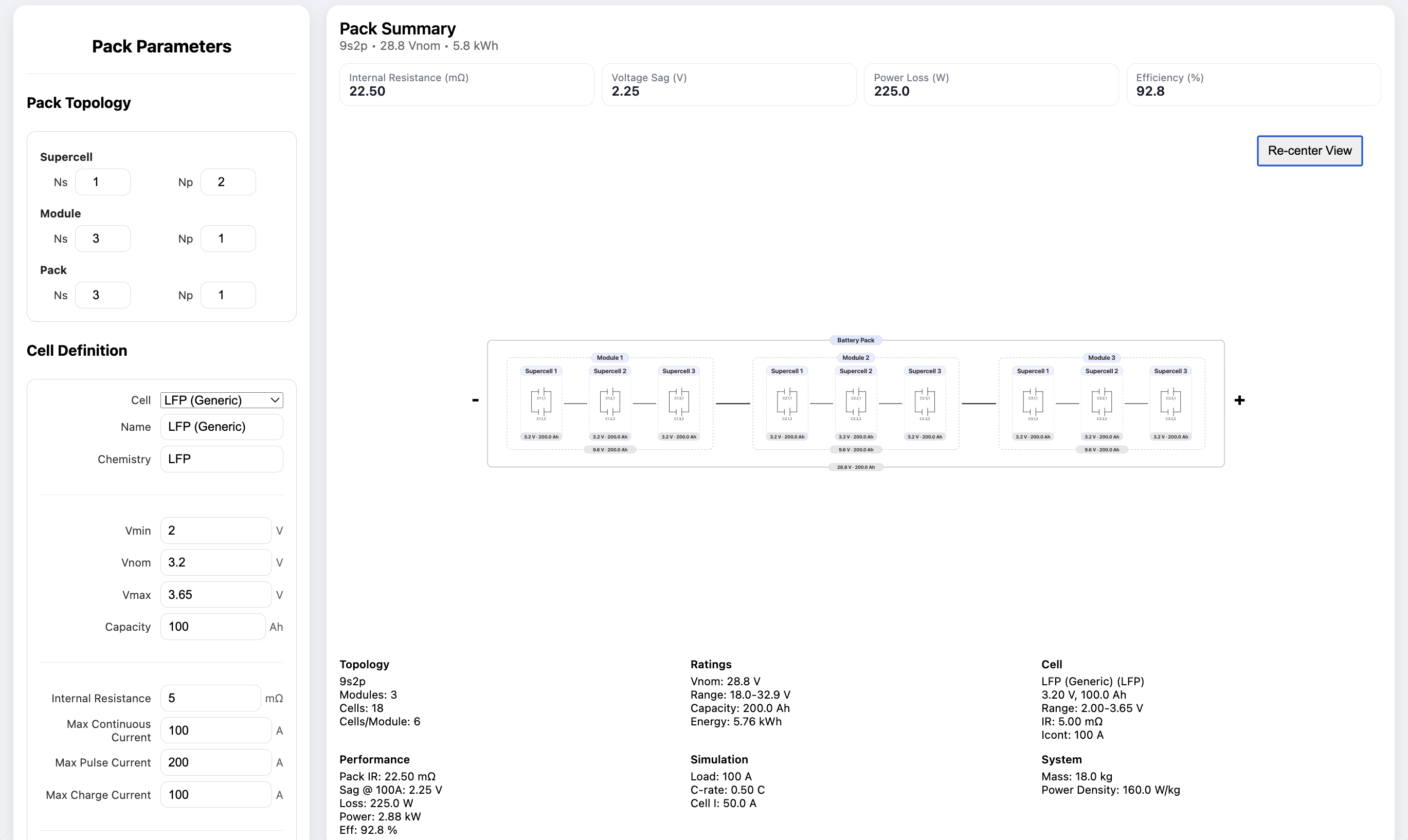
Pack Architect is a battery pack visualization and first-order simulation tool I built to make lithium battery pack discussions faster and more concrete - whether exploring new designs, explaining concepts, or working through a problem, it helps add context and clarity.
Packs are defined hierarchically from cell to supercell to module to full pack. As I adjust series and parallel cell counts, a symbolic schematic updates dynamically, making it easier to understand how pack structure drives behavior and performance.
Pack Architect also performs first-order calculations based on the defined pack topology and cell parameters. It’s not a full battery model, but it makes early topology decisions explicit and traceable.
Repository: github.com/pilotingpete/Pack-Architect
Background
Let me zoom out for a moment to explain what I mean by battery pack topology and architecture, so that we can orient ourselves for the rest of this post.
Battery cells are the building blocks of a battery pack. Cells have characteristic parameters such as voltage (the potential difference), capacity (the amount of charge they can hold), and internal resistance (which affects how much current they source under load). Depending on the chemistry and design of the cell, these parameters will vary. A representative lithium-ion cell might have a nominal voltage of 3.7V, a capacity of 2Ah, and an internal resistance of 50 milliohms.
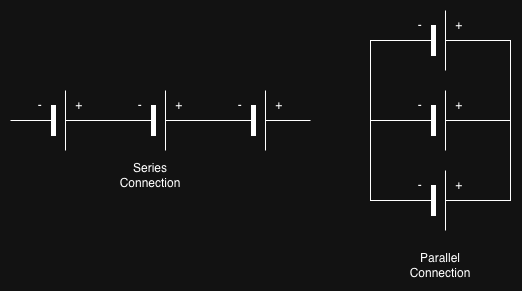
When designing a battery pack, cells are usually combined in two basic ways: series and parallel. In a series connection, each cell’s positive terminal connects to the next cell’s negative terminal. In a parallel connection, the positive terminals are connected together, and the negative terminals are connected together.
Those arrangements affect the pack differently. Series connections add voltage and resistance. Parallel connections add capacity and reduce effective resistance, because the cell resistances combine like parallel resistors.
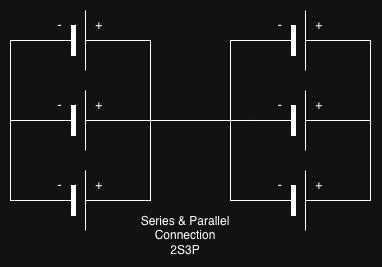
Combinations of series and parallel connections can be made to achieve specific voltage and capacity design goals. For example, a pack with 2 cells in series and 3 in parallel, would be denoted as “2s3p”. This electrical configuration is the pack’s topology.
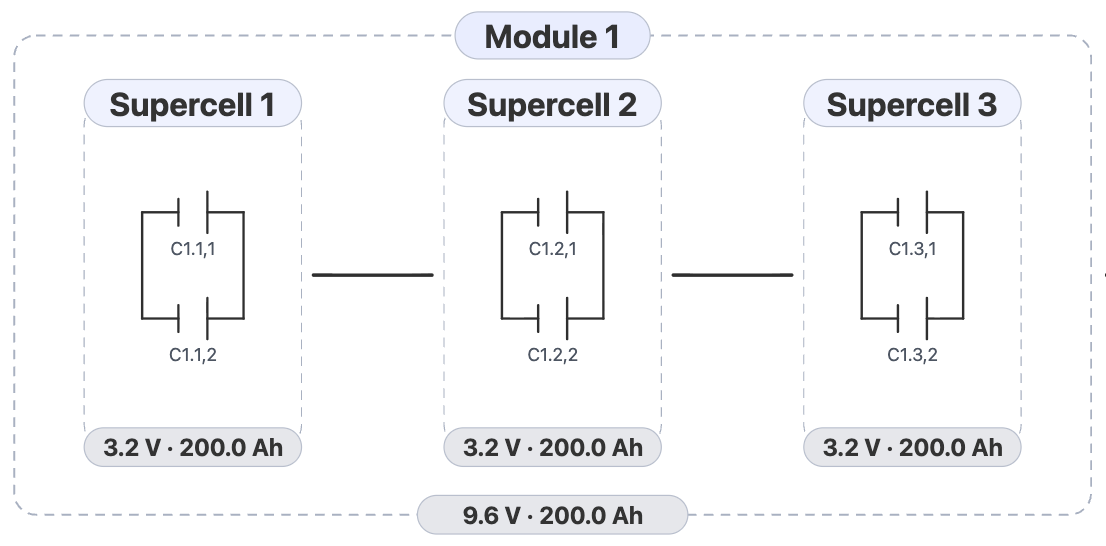
As the pack topology grows, it starts making sense to break the (super)cells into physical groups called modules. This is done primarily as a Design for Manufacturing (DFM) task which is the engineering practice of designing products to optimize manufacturing ease, cost, quality, and speed.
Modules, then, can be arranged by series or parallel connections themselves, to form a full pack. This is the pack’s architecture - the physical manifestation of the topology.
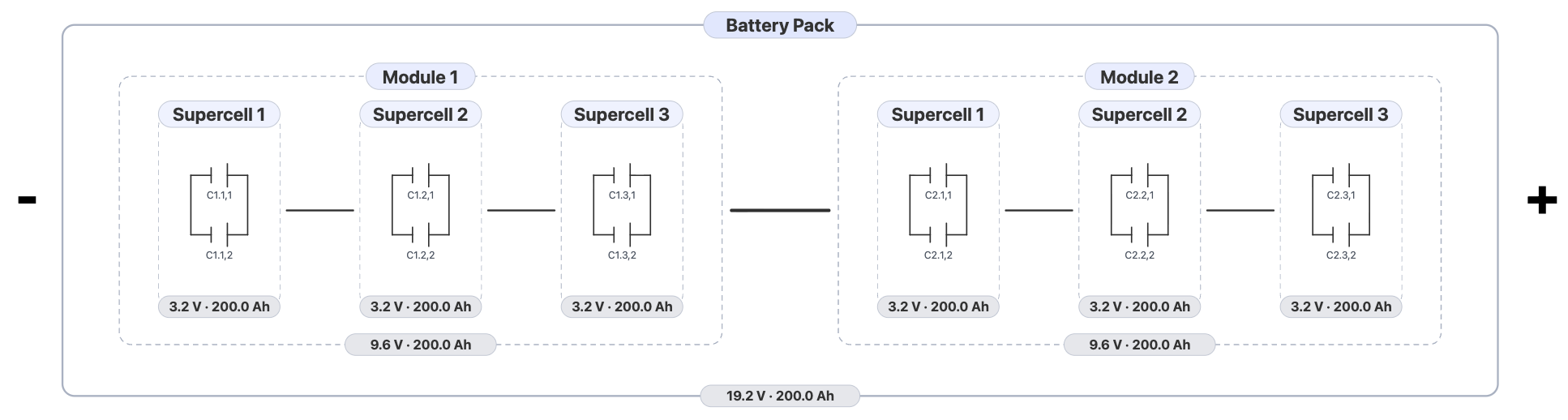
Topology constrains architecture, and architecture realizes (and modifies the behavior of) topology.
The problem
I spend a lot of time discussing battery pack architecture: exploring new designs, explaining concepts, and working through specific scenarios. Those conversations depend on everyone sharing the same mental model, which is harder than it sounds. Battery work has a lot of domain-specific language, and in cross-functional conversations the gap between what someone says and what someone hears can be wide.
Whiteboarding helps. Sketching the topology in real time gives everyone something concrete to react to. But once the numbers enter the conversation, the sketch only gets you so far. Voltage, capacity, resistance, sag, and loss all change as series and parallel relationships stack through the pack hierarchy. Trying to track that mentally, mid-discussion, gets unwieldy fast.
The deeper problem is the transition from rough concept to detailed design. Early pack architecture work often sits in that middle ground: the design is still flexible, but the questions are already specific:
- What topology does this pack actually become after all hierarchy levels are applied?
- How many cells are we really talking about?
- What nominal voltage, capacity, and energy does that imply?
- What happens to resistance, sag, and loss as the structure changes?
- Can I show the architecture clearly enough that someone else can review it without decoding my scratch notes?
Pack Architect came out of that space. The goal was to turn hierarchy choices into something visual, inspectable, and exportable, without requiring a full schematic or model first.
What the tool does today
The current version supports three hierarchy levels:
- supercell
- module
- pack
For each level, I can define series and parallel cell counts Ns and Np, and the tool derives the total pack structure from there.
From that hierarchy plus a selected cell model, it computes:
- total series and parallel count
- total cell count
- minimum, nominal, and maximum voltage
- capacity and energy
- pack resistance estimate
- voltage sag under load
- power loss
- efficiency estimate
- C-rate
- cell current
- pack mass and power density when mass is provided
That is enough to make the first pass of a design review much less abstract.
Core formulas
The app is intentionally built around first-order calculations, so a lot of the value comes from making a few simple relationships visible quickly.
They are not a complete battery model, but they do cover the main rollups and quick performance estimates the current tool is designed around.
At the pack level, the main formulas are:
Where:
- is pack voltage
- is cell voltage at the chosen operating point
- is pack capacity in amp-hours
- is cell capacity in amp-hours
- is pack energy in kilowatt-hours
- is pack internal resistance
- is cell internal resistance
- is total series count
- is total parallel count
- is pack load current
- is estimated voltage sag under load
- is estimated resistive power loss
Those are not enough for full pack validation, but they are enough to make early topology decisions much more explicit.
Why the hierarchy model matters
One thing I wanted from the start was a model that respected how packs are usually discussed in real projects.
People do not only think in total Ns and total Np.
They also think in terms of intermediate structure:
- how cells are grouped into a repeated sub-unit
- how those sub-units become modules
- how modules become the full pack
That intermediate structure matters because it affects packaging, serviceability, harnessing, review clarity, and how the system gets talked about across teams.
The tool is built around that hierarchy instead of treating it as an afterthought.
Interface and export workflow
The app is built with React and TypeScript, and during development it runs as a Vite web app. It can also be packaged as a desktop app with Electron.
The diagram view is a big part of the project. I wanted the current architecture to be readable at a glance, not buried in form fields.
Right now the tool supports:
- interactive hierarchy visualization
- cell template selection and custom local cell definitions
- diagram layout presets
- export to
SVG - export to
PNG - export to
XLSX
The export path matters because a lot of tooling becomes more useful the moment it can produce artifacts for review instead of staying trapped in the app.
Why I chose this stack
I chose React and TypeScript because the tool is mostly a live engineering workspace: a lot of derived values, a lot of UI state, and a lot of places where changing one hierarchy input needs to immediately update the diagram and metrics around it.
Vite made the development loop fast enough that the tool stayed easy to iterate on.
Electron was the practical choice because I wanted the same project to work both as a browser-based development app and as a desktop tool that could be handed around more easily without turning deployment into its own project.
That combination let me stay focused on the battery architecture workflow instead of spending the early phases fighting infrastructure.
What is intentionally out of scope
I have tried to keep the scope honest.
Pack Architect is not currently trying to model:
- SOC dynamics
- time-domain behavior
- thermal transients
- aging or degradation
- detailed BMS behavior
- detailed mechanical packaging
- busbar geometry, fusing, or contactor implementation
That is deliberate.
I would rather have a tool that is clear about doing first-order architecture work well than one that gestures at full-fidelity simulation without enough rigor behind it.
What I like about it so far
The most useful part is that it turns a topology conversation into something legible very quickly.
It helps move discussion away from vague statements like “roughly a 96s pack” and toward more useful review questions:
- what hierarchy are we actually proposing?
- what does that imply electrically?
- what does that do to count, mass, and power?
- is this architecture still sensible when exported and reviewed outside the tool?
That is the point where project discussions usually get better.
Where I would take it next
The next steps I would want to explore are:
- better validated real-world cell presets
- richer export formatting
- reusable import and export for cell libraries
- tests around topology derivation and rating calculations
- optional operating-state or constraint-aware views
I am especially interested in keeping the tool useful as an architecture instrument without letting it collapse under simulation scope creep.
Closing note
Pack Architect is the kind of project I like building because it sits right at the boundary between engineering reasoning and software tooling.
It takes a problem that is usually handled through scattered notes and turns it into something more structured, visual, and easier to review.
Comments